Pytorch Compile Internals
Ever wondered what goes inside when you actually call torch.compile(model)? There are a bunch of individual components that work together in a sequential manner to squeeze out the best performance from the GPU. Each component passes on some intermediate packets called Intermediate Representation (IRs) (more about this later) to the next component in the sequence. Let’s take a look what are the these components at an overview level and then we will dive deep into each one of them.
PS - I got a little bonus at the end!
torch.compile components
- TorchDynamo: The fronend responsible for intercepting the Python code and convert it to graphs.
- AOTAutograd - Takes care of automatic differentiation for backpropagation. Doesn’t gets activate for inference only workloads.
- TorchInductor - Performs optimization including Fusion and converts the input FX Graph into triton code (for GPUs) or C++ code (for CPUs).

1. TorchDynamo
TorchDynamo is the first and foremost component in the sequence which is responsible for intercepting the Python code. It intercepts the Python bytecode at runtime and rewrites blocks of user code into graphs. This involves extracting subgraphs containing PyTorch operations while leaving the non-PyTorcch code untouched.
Shape Polymorphism - Shape polymorphism is the ability of function to adapt to dynamic shape changes. When you do torch.compile, TorchDynamo doesn’t prepare the graph for a static shaped input tensors. But it uses symbolic representation of the tensors shape which allows it to accept dynamic shapes as well.
How it works?
Symbolic Shape Representation - During the graph capture, the dimension sizes are not kept fixed but are treated symbolically. This helps the graph to work with any dynamic shape. TorchDynamo uses SymPy symbolic math library to represent these unknown shapes. The symbolic shapes are passed through the IR enabling TorchInductor to generate the code that is valid for any runtime shape matching the symbolic pattern. It uses something similar to a faketensor (more precisely ShapeEnv attached to a FakeTensorMode) which keeps track of symbolic shape state.
Guards - To ensure that the input shapes matches to that of final symbolic shape represented by the TorchInductor. It relies on something called as Guard which are responsible for guarding (allowing) only those tensors which matches the symbolic shape. If any data is not matched, the guard triggers a recompilation for those shape and stores it for future reference. The Guard checks the following torch.Tensor properties:
- Python class of the tensor (tensor subclassing, etc)
- dtype
- device
- requires_grad
- dispatch_key (with thread-local includes/excludes applied)
- ndim
- sizes*
- strides*
Loop-Level IR and Indexing - The loops and memory access patterns are also expressed through symbolic representations so that the output shapes, stride calculations and buffer allocations all adapt to the actual runtime of the input tensor shape.
Meta Functions and Shape Propagation - Each PyTorch operator traces “meta” computation, meaning functions that can deduce the output shape for any arbitrary shape inputs without explicitly performing the tensor computations. It enables TorchInductor to carry information regarding unknown dimension through all computations and memory allocations.
Efficient Reuse and Specialization - The compilation for one family of inputs shapes (one that fits the guard) can be reused. Only new inputs shape which doesn’t fit the guards needs recompilation.
Fallback - If the code can’t be converted into graphs, it safely fall backs to PyTorch’s eager execution.
Intermediate Representation (IR) - FX Graph and modified bytecode capturing only PyTorch operations and tensors and leaving normal Python non-essentials.
Let’s take an example of a simple Self Attention Code (without masking and scaling factor):
class Attention(nn.Module):
  def __init__(self, dim=1024):
    super().__init__()
    self.W_q = nn.Linear(dim, dim, bias=False)
    self.W_k = nn.Linear(dim, dim, bias=False)
    self.W_v = nn.Linear(dim, dim, bias=False)

  def forward(self, x: torch.Tensor):
    q = self.W_q(x)
    k = self.W_k(x)
    v = self.W_v(x)

    out = q @ k.transpose(-2, -1)

    # Apply softmax manually
    out = torch.exp(out) / torch.sum(torch.exp(out), dim=-1, keepdim=True)
    return out @ v
To see the output logs, you need to call PyTorch internal logging api
import torch
import logging
import torch._logging as logging_api
import torch._dynamo.config as dcfg

# Enable logs for torchdynamo and also show the generated bytecode
logging_api.set_logs(dynamo=logging.INFO, bytecode=True) #, graph=False, output_code=False, autograd=False, aot_graphs=False, inductor=False)
dcfg.verbose = True  # adds extra Dynamo verbosity
dcfg.suppress_errors = False
Let’s run the torch.compile,
logging_api.set_logs(dynamo=logging.INFO, bytecode=True)
model = Attention(dim=64).to(torch.device("cuda"))
x = torch.rand(1, 4, 64, device=torch.device("cuda"))
torch.compile(model)(x)
torch.compiler.reset() # Resets the cache and graph
Output
- Input Bytecode
  8           0 RESUME                   0

  9           2 LOAD_FAST                0 (self)
              4 LOAD_METHOD              0 (W_q)
             26 LOAD_FAST                1 (x)
             28 PRECALL                  1
             32 CALL                     1
             42 STORE_FAST               2 (q)

 10          44 LOAD_FAST                0 (self)
             46 LOAD_METHOD              1 (W_k)
             68 LOAD_FAST                1 (x)
             70 PRECALL                  1
             74 CALL                     1
             84 STORE_FAST               3 (k)

 11          86 LOAD_FAST                0 (self)
             88 LOAD_METHOD              2 (W_v)
            110 LOAD_FAST                1 (x)
            112 PRECALL                  1
            116 CALL                     1
            126 STORE_FAST               4 (v)

 13         128 LOAD_FAST                2 (q)
            130 LOAD_FAST                3 (k)
            132 LOAD_METHOD              3 (transpose)
            154 LOAD_CONST               1 (-2)
            156 LOAD_CONST               2 (-1)
            158 PRECALL                  2
            162 CALL                     2
            172 BINARY_OP                4 (@)
            176 STORE_FAST               5 (out)

 16         178 LOAD_GLOBAL              8 (torch)
            190 LOAD_METHOD              5 (exp)
            212 LOAD_FAST                5 (out)
            214 PRECALL                  1
            218 CALL                     1
            228 LOAD_GLOBAL              8 (torch)
            240 LOAD_METHOD              6 (sum)
            262 LOAD_GLOBAL              8 (torch)
            274 LOAD_METHOD              5 (exp)
            296 LOAD_FAST                5 (out)
            298 PRECALL                  1
            302 CALL                     1
            312 LOAD_CONST               2 (-1)
            314 LOAD_CONST               3 (True)
            316 KW_NAMES                 4
            318 PRECALL                  3
            322 CALL                     3
            332 BINARY_OP               11 (/)
            336 STORE_FAST               5 (out)

 17         338 LOAD_FAST                5 (out)
            340 LOAD_FAST                4 (v)
            342 BINARY_OP                4 (@)
            346 RETURN_VALUE
| Column Index | Example | Meaning |
|---|---|---|
0 | 13 | Source code line number (from the Python file) |
1 | 128 | Bytecode offset (address) — tells where in memory this opcode lives (used for jumps, flow control) |
2 | LOAD_FAST | Opcode (instruction name) — the operation being done |
3 | 2 | Operand/Argument — here, it’s the index of the local variable |
4 | (q) | Resolved name (if known) — in this case, local variable q |
- Compiled ouput ByteCode
  8           0 RESUME                   0
              2 LOAD_GLOBAL             19 (NULL + __compiled_fn_3)
             14 LOAD_FAST                0 (self)
             16 LOAD_ATTR               10 (_modules)
             26 LOAD_CONST               5 ('W_q')
             28 BINARY_SUBSCR
             38 LOAD_ATTR               11 (_parameters)
             48 LOAD_CONST               6 ('weight')
             50 BINARY_SUBSCR
             60 LOAD_FAST                1 (x)
             62 LOAD_FAST                0 (self)
             64 LOAD_ATTR               10 (_modules)
             74 LOAD_CONST               7 ('W_k')
             76 BINARY_SUBSCR
             86 LOAD_ATTR               11 (_parameters)
             96 LOAD_CONST               6 ('weight')
             98 BINARY_SUBSCR
            108 LOAD_FAST                0 (self)
            110 LOAD_ATTR               10 (_modules)
            120 LOAD_CONST               8 ('W_v')
            122 BINARY_SUBSCR
            132 LOAD_ATTR               11 (_parameters)
            142 LOAD_CONST               6 ('weight')
            144 BINARY_SUBSCR
            154 PRECALL                  4
            158 CALL                     4
            168 UNPACK_SEQUENCE          1
            172 RETURN_VALUE
See the difference? The modified byte code only contains the important stuff from a PyTorch perspective and removed everything at the Python level.
- Guards
GUARDS:

- RootGuardManager
  - DEFAULT_DEVICE: utils_device.CURRENT_DEVICE == None
  - GLOBAL_STATE: ___check_global_state()
  - TORCH_FUNCTION_MODE_STACK: ___check_torch_function_mode_stack()
  - GuardManager: source=L['x'], accessed_by=DictGetItemGuardAccessor('x')
    - TENSOR_MATCH: check_tensor(L['x'], Tensor, DispatchKeySet(CUDA, BackendSelect, ADInplaceOrView, AutogradCUDA), torch.float32, device=0, requires_grad=False, size=[1, 4, 64], stride=[256, 64, 1])
    - NO_HASATTR: hasattr(L['x'], '_dynamo_dynamic_indices') == False
  - GuardManager: source=L['self'], accessed_by=DictGetItemGuardAccessor('self')
    - TYPE_MATCH: ___check_type_id(L['self'], 539598912)
    - GuardManager: source=L['self'].__dict__, accessed_by=GetGenericDictGuardAccessor
      - GuardManager: source=L['self']._modules, accessed_by=DictGetItemGuardAccessor('_modules')
        - DICT_LENGTH: len(L['self']._modules) == 3
        - GuardManager: source=L['self']._modules['W_q'], accessed_by=DictGetItemGuardAccessor('W_q')
          - TYPE_MATCH: ___check_type_id(L['self']._modules['W_q'], 519852416)
          - GuardManager: source=L['self']._modules['W_q'].__dict__, accessed_by=GetGenericDictGuardAccessor
            - DICT_CONTAINS: not ___dict_contains('forward', L['self']._modules['W_q'].__dict__)
            - GuardManager: source=L['self']._modules['W_q']._parameters, accessed_by=DictGetItemGuardAccessor('_parameters')
              - DICT_LENGTH: len(L['self']._modules['W_q']._parameters) == 2
              - GuardManager: source=L['self']._modules['W_q']._parameters['weight'], accessed_by=DictGetItemGuardAccessor('weight')
                - TENSOR_MATCH: check_tensor(L['self']._modules['W_q']._parameters['weight'], Parameter, DispatchKeySet(CUDA, BackendSelect, ADInplaceOrView, AutogradCUDA), torch.float32, device=0, requires_grad=True, size=[64, 64], stride=[64, 1])
              - GuardManager: source=L['self']._modules['W_q']._parameters['bias'], accessed_by=DictGetItemGuardAccessor('bias')
                - ID_MATCH: ___check_obj_id(L['self']._modules['W_q']._parameters['bias'], 9695488)
Note this
- TENSOR_MATCH: check_tensor(L['x'], Tensor, DispatchKeySet(CUDA, BackendSelect, ADInplaceOrView, AutogradCUDA), torch.float32, device=0, requires_grad=False, size=[1, 4, 64], stride=[256, 64, 1])
This tensor match looks for the input tensors with shape as [1, 4, 64] and stride with [256, 64, 1]. The stride basically tells how many cells to jump to fetch the next value block. And since the memory are laid in linear format, each index tells how many jumps are required to get to the next block for same dimension.
For example:
- At 0 index (1) - This represents the batch size, each batch contain a 2D array of shape
[4, 64]which contains a total of 256 elements. Now, these elements are located in the memory in a linear format. Hence to reach to the next batch, you need to jump 256 steps to get to the next batch. - At 1 index (4) - This represent the second order in the grid, each array in this block contains a subarray of 64 elements. That means to get to the first element of the next array you need to jump 64 steps.
- At 2 index (64) - This is the last index which, for each next element you only need to take the next step.
I strongly suggest you to watch this small chapter from on Tensor Layout from Umar Jamil’s Flash Attention Video to get a better understanding of memory layout and stride.
It will also make you appreciate the subtleness in .continuous() and how does tranpose actually make the tensor non-continous.
I am not covering this here since it requires a separate article on its own.
2. Ahead-Of-Time Autograd (AOTAutograd)
As the name suggests AOTAutograd is responsible for differentiation and backpropagation graph generation. it generates the backware computation graph (needed for the gradients and training) from the captured forward graph (passed by the TorchDynamo). However it only captures the backward graph and doesn’t apply the graph level optimization.
Let see the forward and backward graph when it passes through the AOTAutograd.
Forward Graph
class GraphModule(torch.nn.Module):
  def forward(
    self,
    primals_1: "f32[64, 64][64, 1]cuda:0",
    primals_2: "f32[1, 4, 64][256, 64, 1]cuda:0",
    primals_3: "f32[64, 64][64, 1]cuda:0",
    primals_4: "f32[64, 64][64, 1]cuda:0"
  ):
    # q = self.W_q(x)
    permute: "f32[64, 64][1, 64]cuda:0" = torch.ops.aten.permute.default(primals_1, [1, 0])
    view: "f32[4, 64][64, 1]cuda:0" = torch.ops.aten.view.default(primals_2, [4, 64])
    mm: "f32[4, 64][64, 1]cuda:0" = torch.ops.aten.mm.default(view, permute)
    view_1: "f32[1, 4, 64][256, 64, 1]cuda:0" = torch.ops.aten.view.default(mm, [1, 4, 64])

    # k = self.W_k(x)
    permute_1: "f32[64, 64][1, 64]cuda:0" = torch.ops.aten.permute.default(primals_3, [1, 0])
    mm_1: "f32[4, 64][64, 1]cuda:0" = torch.ops.aten.mm.default(view, permute_1)
    view_3: "f32[1, 4, 64][256, 64, 1]cuda:0" = torch.ops.aten.view.default(mm_1, [1, 4, 64])

    # v = self.W_v(x)
    permute_2: "f32[64, 64][1, 64]cuda:0" = torch.ops.aten.permute.default(primals_4, [1, 0])
    mm_2: "f32[4, 64][64, 1]cuda:0" = torch.ops.aten.mm.default(view, permute_2)
    view_5: "f32[1, 4, 64][256, 64, 1]cuda:0" = torch.ops.aten.view.default(mm_2, [1, 4, 64])

    # out = q @ k.transpose(-2, -1)
    permute_3: "f32[1, 64, 4][256, 1, 64]cuda:0" = torch.ops.aten.permute.default(view_3, [0, 2, 1])
    expand: "f32[1, 4, 64][256, 64, 1]cuda:0" = torch.ops.aten.expand.default(view_1, [1, 4, 64])
    expand_1: "f32[1, 64, 4][256, 1, 64]cuda:0" = torch.ops.aten.expand.default(permute_3, [1, 64, 4])
    bmm: "f32[1, 4, 4][16, 4, 1]cuda:0" = torch.ops.aten.bmm.default(expand, expand_1)

    # out = torch.exp(out) / torch.sum(torch.exp(out), dim=-1, keepdim=True)
    exp: "f32[1, 4, 4][16, 4, 1]cuda:0" = torch.ops.aten.exp.default(bmm)
    sum_1: "f32[1, 4, 1][4, 1, 1]cuda:0" = torch.ops.aten.sum.dim_IntList(exp, [-1], True)
    div: "f32[1, 4, 4][16, 4, 1]cuda:0" = torch.ops.aten.div.Tensor(exp, sum_1)

    # return out @ v
    expand_2: "f32[1, 4, 4][16, 4, 1]cuda:0" = torch.ops.aten.expand.default(div, [1, 4, 4])
    expand_3: "f32[1, 4, 64][256, 64, 1]cuda:0" = torch.ops.aten.expand.default(view_5, [1, 4, 64])
    bmm_1: "f32[1, 4, 64][256, 64, 1]cuda:0" = torch.ops.aten.bmm.default(expand_2, expand_3)
    return (bmm_1, view, bmm, div, permute_5, permute_6, permute_7)
)
Backward Graph
class GraphModule(torch.nn.Module):
  def forward(self, view: "f32[4, 64][64, 1]cuda:0", bmm: "f32[1, 4, 4][16, 4, 1]cuda:0", div: "f32[1, 4, 4][16, 4, 1]cuda:0", permute_5: "f32[1, 64, 4][256, 1, 64]cuda:0", permute_6: "f32[1, 64, 4][256, 1, 64]cuda:0", permute_7: "f32[1, 4, 64][256, 64, 1]cuda:0", tangents_1: "f32[1, 4, 64][256, 64, 1]cuda:0"):
      # return out @ v
      expand_2: "f32[1, 4, 4][16, 4, 1]cuda:0" = torch.ops.aten.expand.default(div, [1, 4, 4])
      permute_4: "f32[1, 4, 4][16, 1, 4]cuda:0" = torch.ops.aten.permute.default(expand_2, [0, 2, 1]);  expand_2 = None
      bmm_2: "f32[1, 4, 64][256, 64, 1]cuda:0" = torch.ops.aten.bmm.default(permute_4, tangents_1);  permute_4 = None
      bmm_3: "f32[1, 4, 4][16, 4, 1]cuda:0" = torch.ops.aten.bmm.default(tangents_1, permute_5);  tangents_1 = permute_5 = None

      #  out = torch.exp(out) / torch.sum(torch.exp(out), dim=-1, keepdim=True)
      exp: "f32[1, 4, 4][16, 4, 1]cuda:0" = torch.ops.aten.exp.default(bmm);  bmm = None
      sum_1: "f32[1, 4, 1][4, 1, 1]cuda:0" = torch.ops.aten.sum.dim_IntList(exp, [-1], True)
      div_2: "f32[1, 4, 4][16, 4, 1]cuda:0" = torch.ops.aten.div.Tensor(div, sum_1);  div = None
      neg: "f32[1, 4, 4][16, 4, 1]cuda:0" = torch.ops.aten.neg.default(bmm_3)
      mul: "f32[1, 4, 4][16, 4, 1]cuda:0" = torch.ops.aten.mul.Tensor(neg, div_2);  neg = div_2 = None
      div_3: "f32[1, 4, 4][16, 4, 1]cuda:0" = torch.ops.aten.div.Tensor(bmm_3, sum_1);  bmm_3 = sum_1 = None
      sum_2: "f32[1, 4, 1][4, 1, 1]cuda:0" = torch.ops.aten.sum.dim_IntList(mul, [2], True);  mul = None
      expand_4: "f32[1, 4, 4][4, 1, 0]cuda:0" = torch.ops.aten.expand.default(sum_2, [1, 4, 4]);  sum_2 = None
      mul_1: "f32[1, 4, 4][16, 4, 1]cuda:0" = torch.ops.aten.mul.Tensor(expand_4, exp);  expand_4 = None
      mul_2: "f32[1, 4, 4][16, 4, 1]cuda:0" = torch.ops.aten.mul.Tensor(div_3, exp);  div_3 = exp = None
      add: "f32[1, 4, 4][16, 4, 1]cuda:0" = torch.ops.aten.add.Tensor(mul_1, mul_2);  mul_1 = mul_2 = None

      # out = q @ k.transpose(-2, -1)
      bmm_4: "f32[1, 64, 4][256, 4, 1]cuda:0" = torch.ops.aten.bmm.default(permute_6, add);  permute_6 = None
      bmm_5: "f32[1, 4, 64][256, 64, 1]cuda:0" = torch.ops.aten.bmm.default(add, permute_7);  add = permute_7 = None
      permute_8: "f32[1, 4, 64][256, 1, 4]cuda:0" = torch.ops.aten.permute.default(bmm_4, [0, 2, 1]);  bmm_4 = None

      # v = self.W_v(x)
      view_18: "f32[4, 64][64, 1]cuda:0" = torch.ops.aten.view.default(bmm_2, [4, 64]);  bmm_2 = None
      permute_9: "f32[64, 4][1, 64]cuda:0" = torch.ops.aten.permute.default(view_18, [1, 0]);  view_18 = None
      mm_3: "f32[64, 64][64, 1]cuda:0" = torch.ops.aten.mm.default(permute_9, view);  permute_9 = None

      # k = self.W_k(x)
      view_19: "f32[4, 64][1, 4]cuda:0" = torch.ops.aten.view.default(permute_8, [4, 64]);  permute_8 = None
      permute_12: "f32[64, 4][4, 1]cuda:0" = torch.ops.aten.permute.default(view_19, [1, 0]);  view_19 = None
      mm_4: "f32[64, 64][64, 1]cuda:0" = torch.ops.aten.mm.default(permute_12, view);  permute_12 = None

      # q = self.W_q(x)
      view_20: "f32[4, 64][64, 1]cuda:0" = torch.ops.aten.view.default(bmm_5, [4, 64]);  bmm_5 = None
      permute_15: "f32[64, 4][1, 64]cuda:0" = torch.ops.aten.permute.default(view_20, [1, 0]);  view_20 = None
      mm_5: "f32[64, 64][64, 1]cuda:0" = torch.ops.aten.mm.default(permute_15, view);  permute_15 = view = None
      return (mm_5, None, mm_4, mm_3)
Observe how the backpropagation graph actually starts from the last operations and backtracks it till the top as expected. You will also notice that all the operations are being initialized by torch.ops.aten, what is aten?
ATen (short for “A Tensor Library”) is the core C++ tensor library underlying almost all tensor operations in PyTorch. It provides:
The foundational Tensor class in PyTorch.
Hundreds of mathematical and tensor operations (such as addition, multiplication, reshaping, etc.).
The backend infrastructure to dispatch these operations seamlessly to CPU, CUDA (GPU), and other supported devices.
Some common ATen opertors you will see in the graph
aten.mm: It simply represents a matrix multiplication.aten.view: Used to change the shape of the tensor without modifying the memory layout.aten.permute: Rearranges the dimension of the (axes of the tensors).aten.sum: Sum operation on the given tensoraten.exp: Raises the value by its exponent.
3. TorchInductor
It further optimizes the graph and generates code to finally run on the hardware. It takes a simplified computation graphs and generates hihgly optimized low level code for the target hardware (CPU, HPU, GPU).
It also determines hardware level optimizations such as memory planning, tiling etc.
Due to multiple hardware adoption, torchinductor supports multiple backend based on the target hardware.
Backend supported in TorchInductor
| Backend | Description |
|---|---|
| Inductor | Default backend: highly optimized for CPUs and GPUs |
| Eager | Runs the model without the graph capture, no optimization happens in this mode |
| aot_eager | It applies the AutoAutograd to capture the graph but doesn’t apply any further backend optimization |
| cudagraphs | Leverages CUDA Graphs for reduces CPU overhead |
| ipex | Uses Intel Extension for PyTorch for CPU-optimized execution |
| onnxrt | Uses ONNX runtime for acceleration on CPU/GPU |
| torch_tensorrt | TensorRT-backend for high-speed inference on Nvidia-GPUs |
| tvm | Uses Apache TVM compiler for cross hardware inference |
| openvino | Uses Intel OpenVINO for accelerated inference on supported Intel hardware |
Note that depending on the type inference/training, the supported backends might change.
Let’s consider the same Attention Block example and let’s see what optimizations TorchInductor does
Fusion
Fusion is basically nothing but merging mutiple operations in kernel into one. So rahter than following the loop of reading from memory -> Performing operations -> Writing back to memory for each operation. Fusion allows to sandwich all the operations into one layer so that it becomes; reading from memory -> Perform all the operations at once -> Write back to the memory. This saves us to and from time of reading and writing from and to memory.
Assume that the geometrical shapes are the data points which are juggling between the memory and compute (your GPU). Now after every compute you send the data points back to the memory. This takes up a lot of time.
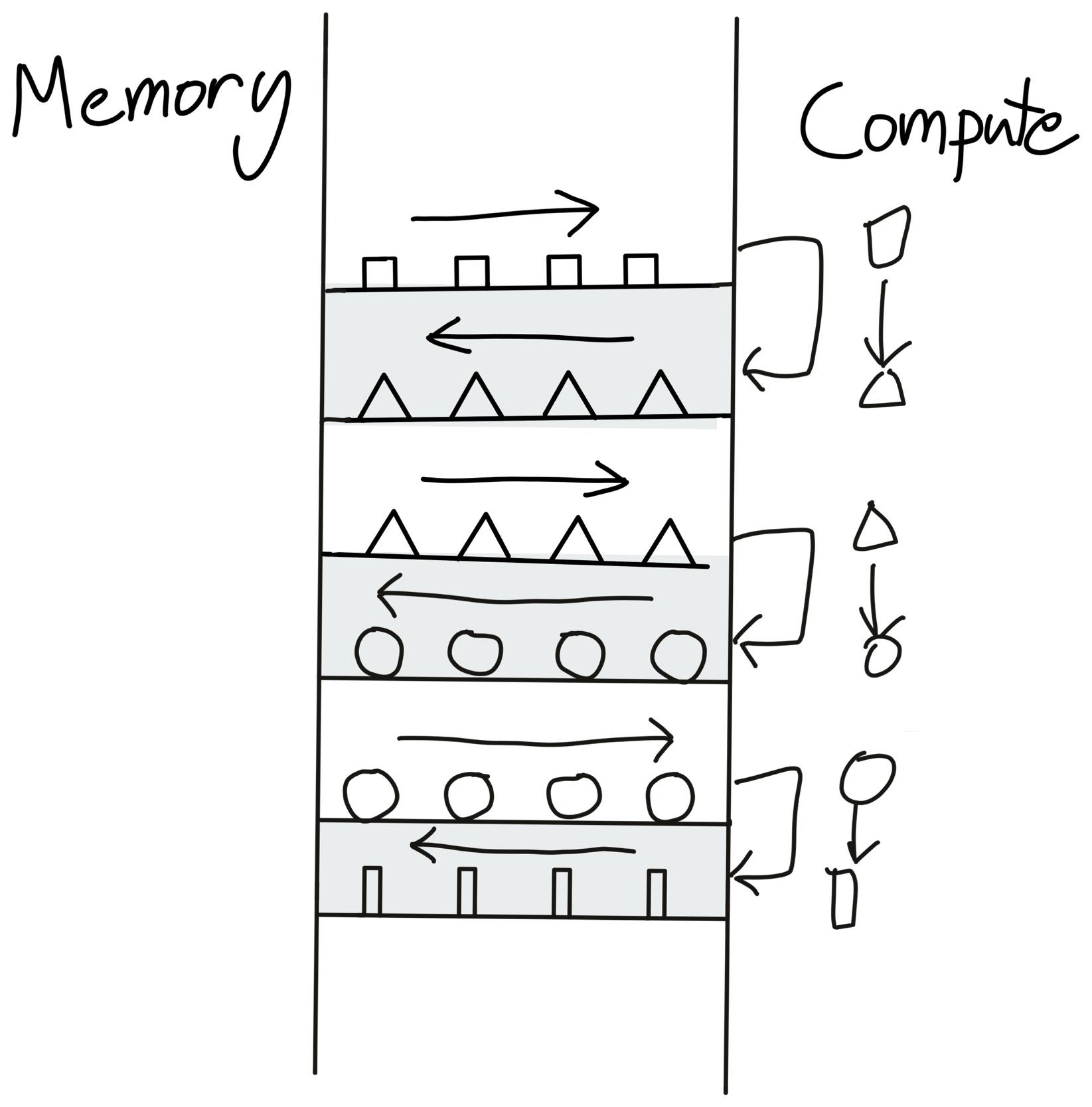 Before Fusion: Illustration taken from Making Deep Learning Go Brrrr From First Principles by Horace He
To save this time, we load the data points once, perform all the compute and then finally send it back to the memory.
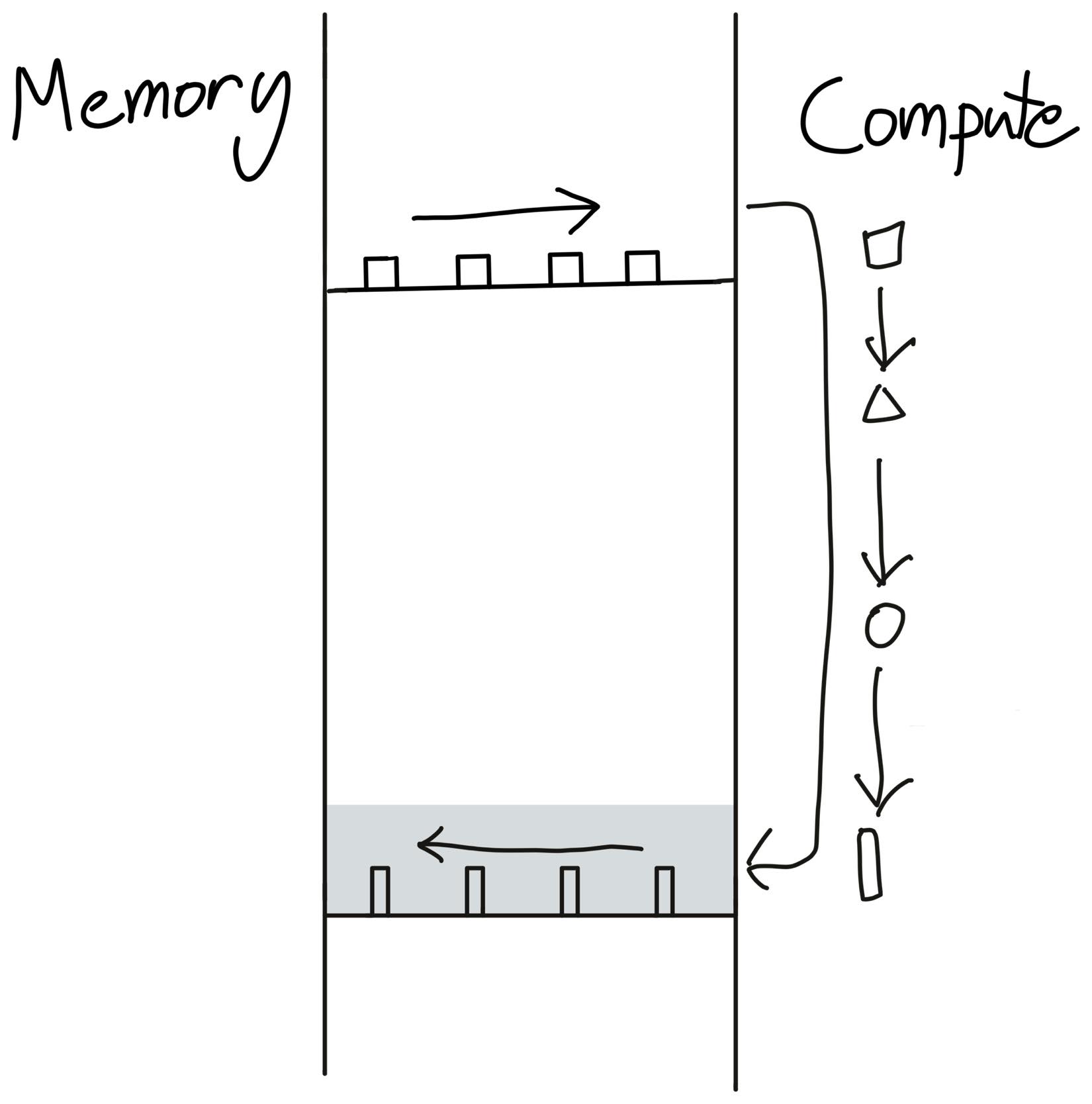 After Fusion: Illustration taken from Making Deep Learning Go Brrrr From First Principles by Horace He
logging_api.set_logs(inductor=logging.INFO, fusion=True) # Let's see where the optimization is coming from model = Attention(dim=4096).to(torch.device("cuda")) x = torch.rand(4, 1024, 4096, device=torch.device("cuda")) torch.compile(model)(x) execution_time = triton.testing.do_bench(lambda: model(x)) print(f"Time to execute: {execution_time:.2f}") torch.compiler.reset()TorchInductor performs operations fusions in an iterative manner. Once it performs any fusion, it checks again for any further possible fusion.
=== Fusion Round 1 ===
Candidates for fusion:
- ExternKernelSchedulerNode(name='op0')
- ExternKernelSchedulerNode(name='op1')
- ExternKernelSchedulerNode(name='op2')
- ExternKernelSchedulerNode(name='op3')
- SchedulerNode(name='op4'), Reduction([1024], sum, origins=[sum_1, exp])
- SchedulerNode(name='op5'), Pointwise([4, 1024, 1024], origins=[div, exp])
- ExternKernelSchedulerNode(name='op6')

Found 1 possible fusion:
- Fusing `op4` with `op5`

Result:
- Fused 7 nodes into 6 nodes

=== Fusion Round 2 ===
Candidates for fusion:
- ExternKernelSchedulerNode(name='op0')
- ExternKernelSchedulerNode(name='op1')
- ExternKernelSchedulerNode(name='op2')
- ExternKernelSchedulerNode(name='op3')
- FusedSchedulerNode(op4_op5):
    - op4: Reduction([1024], sum, origins=[sum_1, exp])
    - op5: Pointwise([4, 1024, 1024], origins=[div, exp])
- ExternKernelSchedulerNode(name='op6')

Found 0 possible fusions:
- Nodes remain unchanged (6 → 6)
Compiled Triton Code (GPUs)
# Kernel definition
@triton_heuristics.pointwise(
    size_hints={'x': 16},
    filename=__file__,
    triton_meta={
        'signature': {'in_ptr0': '*fp32', 'out_ptr0': '*fp32', 'xnumel': 'i32'},
        'device': DeviceProperties(type='cuda', index=0, multi_processor_count=40, cc=75, major=7, regs_per_multiprocessor=65536, max_threads_per_multi_processor=1024, warp_size=32),
        'constants': {},
        'configs': [AttrsDescriptor.from_dict({'arg_properties': {'tt.divisibility': (0, 1, 2), 'tt.equal_to': ()}, 'cls': 'AttrsDescriptor'})]
    },
    inductor_meta={
        'autotune_hints': set(),
        'kernel_name': 'triton_poi_fused_div_exp_sum_0',
        'mutated_arg_names': [],
        'optimize_mem': False,
        'no_x_dim': False,
        'num_load': 5,
        'num_reduction': 0,
        'backend_hash': '9182018CCD6A4F758231D68D0B1E1E23CEBB32E5D78CB36B65791C4EB96774A2',
        'are_deterministic_algorithms_enabled': False,
        'assert_indirect_indexing': True,
        'autotune_local_cache': True,
        'autotune_pointwise': True,
        'autotune_remote_cache': None,
        'force_disable_caches': False,
        'dynamic_scale_rblock': True,
        'max_autotune': False,
        'max_autotune_pointwise': False,
        'min_split_scan_rblock': 256,
        'spill_threshold': 16,
        'store_cubin': False
    },
    min_elem_per_thread=0
)
@triton.jit
def triton_poi_fused_div_exp_sum_0(in_ptr0, out_ptr0, xnumel, XBLOCK: tl.constexpr):
    # Kernel implementation
    xnumel = 16
    xoffset = tl.program_id(0) * XBLOCK
    xindex = xoffset + tl.arange(0, XBLOCK)[:]
    xmask = xindex < xnumel
    # ...

# Call function
def call(args):
    # Allocate memory for output tensors
    primals_1, primals_2, primals_3, primals_4 = args
    args.clear()
    # Call external kernels
    buf0 = empty_strided_cuda((4, 64), (64, 1), torch.float32)
    extern_kernels.mm(reinterpret_tensor(primals_2, (4, 64), (64, 1), 0), reinterpret_tensor(primals_1, (64, 64), (1, 64), 0), out=buf0)
    # ...
    # Launch Triton kernel
    stream0 = get_raw_stream(0)
    triton_poi_fused_div_exp_sum_0.run(buf3, buf4, 16, grid=grid(16), stream=stream0)
    # Return output tensors
    return (buf5, reinterpret_tensor(primals_2, (4, 64), (64, 1), 0), buf3, buf4, reinterpret_tensor(buf2, (1, 64, 4), (256, 1, 64), 0), reinterpret_tensor(buf0, (1, 64, 4), (256, 1, 64), 0), reinterpret_tensor(buf1, (1, 4, 64), (256, 64, 1), 0), )

# Benchmark function
def benchmark_compiled_module(times=10, repeat=10):
    from torch._dynamo.testing import rand_strided
    from torch._inductor.utils import print_performance
    primals_1 = rand_strided((64, 64), (64, 1), device='cuda:0', dtype=torch.float32)
    primals_2 = rand_strided((1, 4, 64), (256, 64, 1), device='cuda:0', dtype=torch.float32)
    primals_3 = rand_strided((64, 64), (64, 1), device='cuda:0', dtype=torch.float32)
    primals_4 = rand_strided((64, 64), (64, 1), device='cuda:0', dtype=torch.float32)
    fn = lambda: call([primals_1, primals_2, primals_3, primals_4])
    return print_performance(fn, times=times, repeat=repeat)
Now if you see here the output code for the torchinductor is nothing but Python. Seems counterintuitive right? We ingest in Python code and burps out Python code but the output Python code is faster.
TorchInductor Modes
TorchInductor also allows you to select between different types of modes for your use cases.
| Mode | Purpose | Compilation Time | Runtime Speed | Notes |
|---|---|---|---|---|
| default | Balanced compilation and runtime | Moderate | Moderate to high | Good for general use |
| reduce-overhead | Reduce Python/kernel launch overhead | Faster | Low latency, especially small batches | Uses CUDA graphs, less flexible suitable for realtime and low latency requirements. Focuses on reducing the CPU to GPU overhead |
| max-autotune | Exhaustive autotuning for optimal kernels | Longest | Highest | Uses Triton, CUDA graphs by default for best performance, chooses the best kernel compatible with the hardware |
| max-autotune-no-cudagraphs | Autotune w/o CUDA graphs | Long | High | When your hardware don’t support CUDA, you want to debug for non deterministic kernel launches or CUDA causing troubles |
| fullgraph (flag) | Compile whole model into one graph | Varies (can increase) | Varies | Useful for deployment specially when you understand you model/code can compile, performs fusion aggresively |
Optimizing Performance
Now that we have understood what are the components in torch.compile. Let’s understand how to debug torch.compile for certain issues:
Recompilations
It may happen that you inference runs might show different (usually higher) latency even after doing torch.compile for some specific inputs. This might be pointing to graph recompilation. Remember we talked about how TorchDynamo uses a Sympy to maintain a log of acceptable shapes. If somehow the guards notices something fishy (like dynamic tensor), they trigger a graph recompilation which takes time.
Let’s see it in action:
model = Attention().cuda()
compiled = torch.compile(model)

# Input with one shape
x1 = torch.randn(8, 1024).cuda()
st = time.perf_counter()
compiled(x1)
print(f"Time took to execute I run: {time.perf_counter() - st:.2f}")
# Input with another shape → triggers recompilation!
x2 = torch.randn(16, 1024).cuda()
st = time.perf_counter()
compiled(x2)
print(f"Time took to execute II run: {time.perf_counter() - st:.2f}")
torch.compiler.reset()
Output
Time took to execute I run: 0.25
Time took to execute II run: 0.52
The second time is almost 2x - 2.5x higher than previous one. Now let’s investigate why this is happening?
# Lets check for the logs for the first run (for recompilation)
logging_api.set_logs(inductor=logging.INFO, recompiles=True)
# Input with shape (8, 1024)
x1 = torch.randn(8, 1024).cuda()
st = time.perf_counter()
compiled(x1)
print(f"Time took to execute I run: {time.perf_counter() - st:.2f}")
Output:
fx graph cache hit for key fiaymikawo6wb665p4sxxdl34aqa2dskcjqyqsbposdn3tqywlqm
[0/0] Step 3: torchinductor done compiling FORWARDS graph 12
Time took to execute I run: 0.27
As expected the input hits the graph and uses it to run the input data which results in faster result(I already compiled the model earlier)
Now, lets consider little tweak in the input shape
# Lets check for the logs for the first run (for recompilation)
logging_api.set_logs(inductor=logging.INFO, recompiles=True)
# Input with shape (16, 1024)
x1 = torch.randn(16, 1024).cuda()
st = time.perf_counter()
compiled(x1)
print(f"Time took to execute II run: {time.perf_counter() - st:.2f}")
Output
Recompiling function forward in /tmp/ipython-input-8-1568882374.py:8
triggered by the following guard failure(s):
- 0/0: tensor 'L['x']' size mismatch at index 0. expected 8, actual 16
[0/1] fx graph cache hit for key fk4po6bondjbymxorlxrxr2yh6ksrt4ktp7s4rd6ozzeyqtytm7p
[0/1] Step 3: torchinductor done compiling FORWARDS graph 13 fx graph cache hit for key fttbvdnusdbfieyg4rk7mtwujffoewhlpg4mevcicwmsvxcy5vzv
[0/1] Step 3: torchinductor done compiling BACKWARDS graph 13
Time took to execute I run: 0.40
Notice the recompilation got triggered because the graph was expecting a shape of
[8, 1024]and not[16, 1024]which resulted in higher time to execution.Compilation Mode We talked about different modes of compilation which can be suited different according to the use cases. Let’s see what fits best for our case.
Note - I have picked most widely popular method that works best for most cases.
Default Mode
logging_api.set_logs(inductor=logging.ERROR)
model = Attention(dim=4096).to(torch.device("cuda"))
x = torch.rand(1, 1024, 4096, device=torch.device("cuda"))
torch.compile(model)(x)
execution_time = triton.testing.do_bench(lambda: model(x))
print(f"Time to execute: {execution_time:.2f} ms")
torch.compiler.reset()          # Resets the graph captured and clears the cache
Output:
Time to execute: 26.45 msNot bad for default, now lets see for other modes.
Max-autotune
logging_api.set_logs(inductor=logging.ERROR)
model = Attention(dim=4096).to(torch.device("cuda"))
x = torch.rand(1, 1024, 4096, device=torch.device("cuda"))
torch.compile(model, mode="max-autotune")(x)
execution_time = triton.testing.do_bench(lambda: model(x))
print(f"Time to execute: {execution_time:.2f} ms")
torch.compiler.reset()          # Resets the graph captured and clears the cache
Output:
Time to execute: 26.06 msreduce-overhead
logging_api.set_logs(inductor=logging.ERROR)
model = Attention(dim=4096).to(torch.device("cuda"))
x = torch.rand(1, 1024, 4096, device=torch.device("cuda"))
torch.compile(model, mode="reduce-overhead")(x)
execution_time = triton.testing.do_bench(lambda: model(x))
print(f"Time to execute: {execution_time:.2f} ms")
torch.compiler.reset()          # Resets the graph captured and clears the cache
Output:
Time to execute: 26.17
Looks like max-autotune is working for our case! Though not much difference since we are not actually dealing with a very large model with large data here. Applying this to larger and more complex models will definitely give you significant gains.
Compilation Failures
There can be scenarious where you might not able to compile your code. There are reasons for that and we need to ensure we don’t include them in our code.
Control Flow Python control flow decisions depend on runtime tensor values PyTorch doesn’t evaluate the tensor value. It builds a symbolic graph, given now you have a conditional output. PyTorch gets confused which path to pick since its not determined and depends on the input data.
Printing and Logging Adding logging or priting statements also makes it difficult for the PyTorch to compile the python code.
Non-Tensor Since you are working with PyTorch, it expects to handle only Tensor values. Any non-tensor value such as list, tuple might also lead to graph breaking
Modifying data on runtime Modifying any data during the runtime also results in graph breaking.
Custom operation or library kernel Any custom operation which is not covered by PyTorch or any library which is not ready for torch.compile might also result in failures.
Let’s take an example to see how it actually looks like in action?
class BrokenAttention(nn.Module):
    def __init__(self, dim=1024):
        super().__init__()
        self.W_q = nn.Linear(dim, dim, bias=False)
        self.W_k = nn.Linear(dim, dim, bias=False)
        self.W_v = nn.Linear(dim, dim, bias=False)

    def forward(self, x: torch.Tensor):
        # Illegal: Python side-effect + int computation based on tensor
        if x.shape[0] > 8:
            print("Batch too big!")  # Graph break here!

        q = self.W_q(x)
        k = self.W_k(x)
        v = self.W_v(x)
        out = q @ k.transpose(-2, -1)
        out = torch.exp(out) / torch.sum(torch.exp(out), dim=-1, keepdim=True)
        return out @ v
logging_api.set_logs(graph_breaks=True) # Try disabling this.
model = BrokenAttention().cuda()
x = torch.rand(16, 4, 1024).cuda()
compiled_model = torch.compile(model)
compiled_model(x)
torch.compiler.reset()
Output
 Graph break in user code at /tmp/ipython-input-31-1969035068.py:11
 Reason: Unsupported: builtin: print [<class 'torch._dynamo.variables.constant.ConstantVariable'>] False
 User code traceback:
   File "/tmp/ipython-input-31-1969035068.py", line 11, in forward
     print("Batch too big!")  # Graph break here!
Bonus
All the codes and logs are available in this notebook. Feel free to play around and unwrap the layers of pytorch.compile.
Happy Learning!
Best environment variable for debugging:
TORCH_COMPILE_DEBUG=1
The PyTorch team has also enabled easier debugging for developers through a flag. This special flag turns on verbose, and the developer-focused debug logs from different layers of the compiler stack—including TorchDynamo, TorchInductor, and related components. This can include guard checks, graph tracing details, shape information, kernel selection steps, and operations that are being compiled or not compiled.
References
- PyTorch 2.0 Live Q&A Series: PT2 Profiling and Debugging
- Ezyang’s ways to use torch compile
- torch.compile, the missing manual
- PyTorch Logging
- Debugging PyTorch Memory with Snapshot
- pytorch.compile docs
- Making GPUs go brr by Horace He
- PyTorch Compile vs Export
- How does torch.compile speed up a transformer